With YouTube still being the most used social media platform, getting your click-through-rate (CTR) right is a no brainer. With that, your YouTube thumbnail is not only the first thing your ideal viewer sees but also often decides whether they click or keep scrolling. In fact, thumbnails (plus title) largely make or break your CTR.
To put some numbers on it: YouTube reports that half of all channels’ videos have an impression CTR (i.e. the percentage of people who saw the thumbnail and clicked) between 2 % and 10 %. That means if 1.000 people see your thumbnail, only 20 to 100 might click. Which is not a lot, so every little design decision counts.
Disclaimer: I’m not here to teach you how to trick people with misleading, inappropriate AI-images. If your thumbnail promises something your video doesn’t deliver, that’s shady and it’ll backfire (on trust, audience retention and, yes, your reputation too). Don‘t be a creep and keep it honest.
How to leverage simple sketches as your creative tool
When I say “sketch”, I don’t mean a fancy digital drawing. I literally mean grabbing the pen tool on your tablet or finger on your phone and scribbling boxes, arrows, or simple symbols onto any picture you want to use (this could even be a screenshot of a scene in your video).
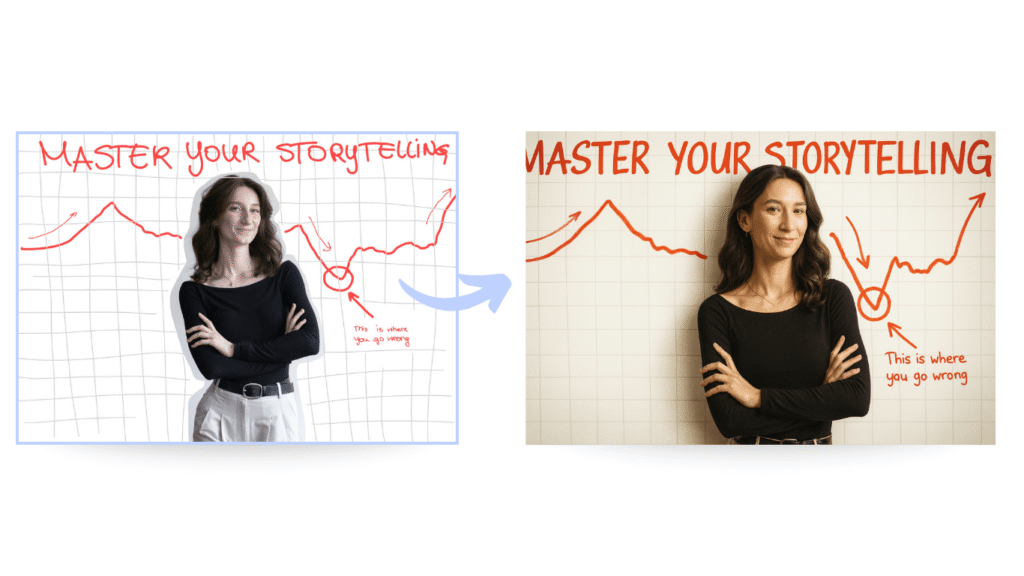
I won’t lie: my drawing skills are… questionable. But: the sketch doesn’t have to look good. It just needs to show the idea alongside a describing word next to it, if necessary. When you upload that scribble to ChatGPT, it is able to read the outlines and interprets them into an image. Here’s an example from the account apollonator3000 on X:
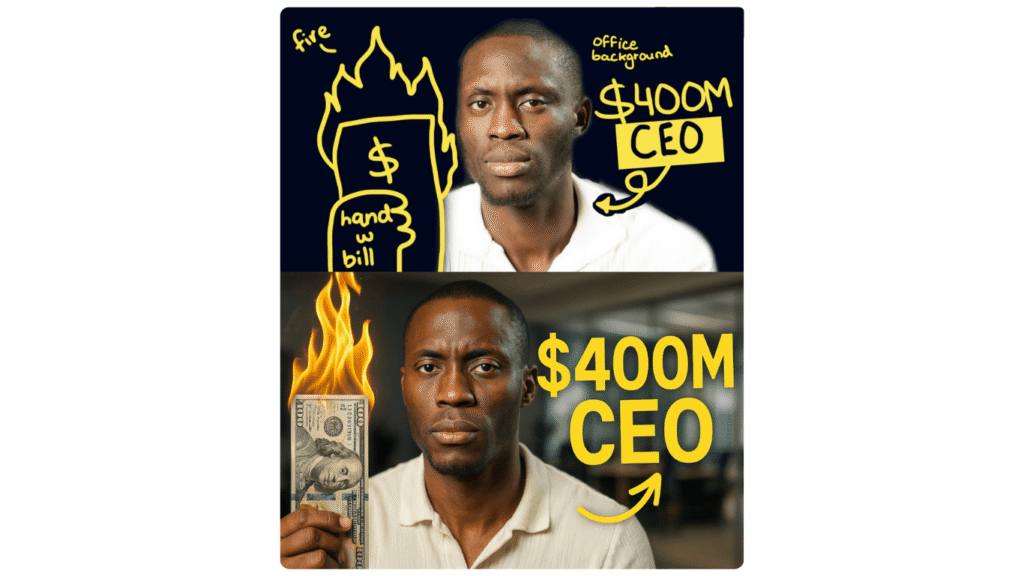
Image source: apollonator3000 on X
From personal experience I will say, though: it doesn’t work perfectly. Sometimes ChatGPT messes up titles or styles and you will have to adjust your prompt a few times.
So why even bother? Because it is an incredibly easy way to test different styles without selling yet another kidney for a template tool.
💡 Pro tip: you can A/B test different composition and leverage those exact insights for future thumbnails. In fact, YouTube lets you test up to three different thumbnails at the same time and provides you with a performance summary after a defined testing period. So what you could do, is, create your thumbnail as you usually would, and A/B test them with two other styles created with AI.
What to include in your prompt (apart from your sketch)
Uploading a scribble is step one. But you definitely want to keep (or add!) your unique style. To ensure this, here‘s what a good prompt should contain:
- Tell ChatGPT to stick to your sketch and provide a description of your thumbnail idea (otherwise it might “get creative” on its own).
- Add style hints with simple adjectives like photo-realistic, cartoon, minimalist.
- Put your creative director hat on and describe the scene as if you’re briefing a photographer or graphic designer: what’s the light like (studio, golden hour, neon signs)? Which camera or lens would capture it best?
- Define colours as specifically as you can. Even HEX codes work to some extent if you already have brand colours.
- Don’t forget the basics: set the right image size and aspect ratio for YouTube (16:9).
Here’s a quick overview you can use for later:
| Prompt element | Why it matters | Example |
| Sketch instruction | Keeps layout aligned with your doodle | Follow drawn boxes for text placement, Keep text exactly where I scribbled, Respect the arrow pointing to the face, … |
| Style hints | Sets the overall look & tone | photo-realistic, minimalist, clean design, bold cartoon, thick outlines, … |
| Camera / lens vibe | Adds realism & depth | shot with a 50mm lens, wide angle perspective, iPhone selfie-style, … |
| Lighting | Defines atmosphere | golden hour sunlight, studio light with shadows, moody neon lighting, … |
| Colour codes | Keeps things on-brand | HEX #FF0000 background, brand blue #0044CC for text, monochrome black & white |
| Size / ratio | Just saves you time in the long run (and let’s you use the thumbnail for other platforms too) | 16:9 (YouTube), 9:16 (Reels) |
I tested this method: here’s what happened
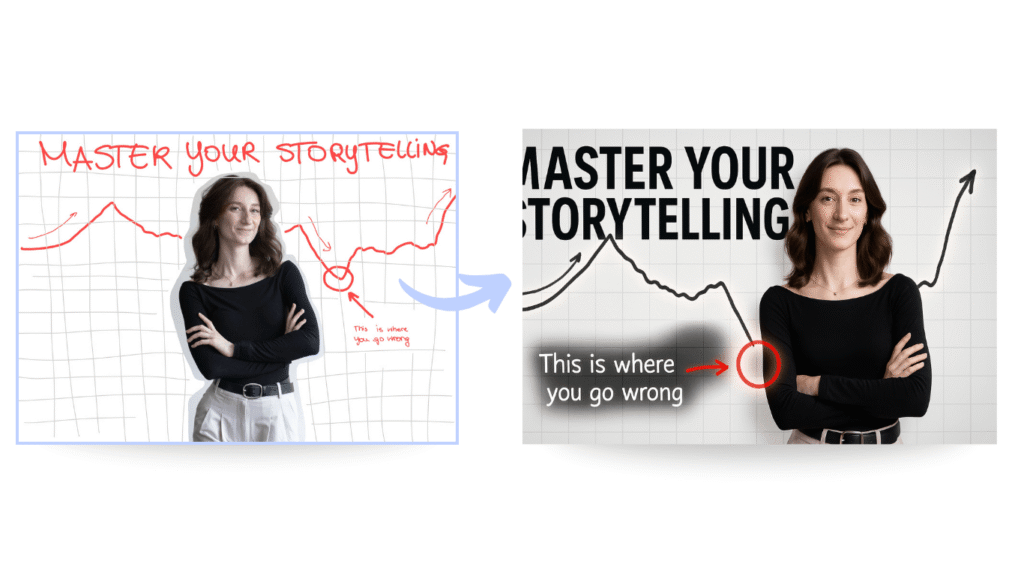
Example 1: Hyper-realistic creation
As you can see, ChatGPT has some difficulty placing the shadow correctly and including all the letters of the thumbnail title. The focus of this example is on generating a realistic image with studio lighting, a white background and a red arrow.
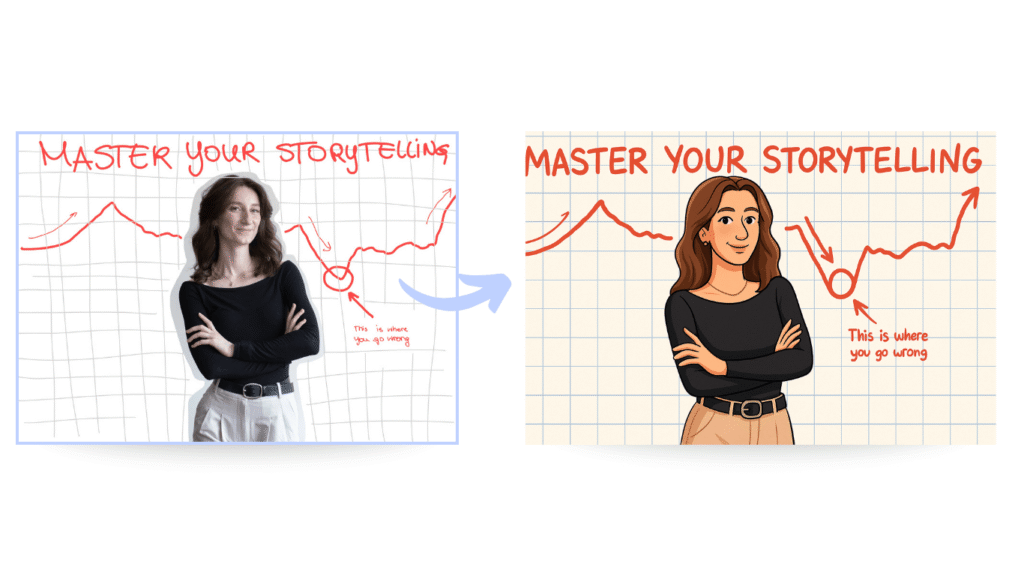
Example 2: Cartoon style
Apart from the circle, I do find that the cartoon-style prompt has worked really well!
Example 3: Low-describing prompt
For example 3, I wanted to see what would happen if I only uploaded the sketch and instructed ChatGPT to ‘follow the rules given in the thumbnail‘, without providing any additional information about style, colour or mood. To my surprise: it didn’t disappoint!
Conclusion
Although ChatGPT won’t magically hand you the perfect thumbnail (you‘ve still got to do the creative thinking and tweaking) and your scribbles don’t have to be final artwork, they’re still a tool to speed up the process. However, I would still recommend using a main thumbnail that you have created as usual alongside your AI ones.
In other words: use ChatGPT as your idea testing tool. The more intentional you are with your sketches and prompts, the more unique and true-to-your-brand your thumbnails will become. Pair that with strong prompts and YouTube’s built-in A/B testing, and you’ve got a simple but killer system to improve your click-through-rate.

Valuable and on the point – thank you!